Choose a chart for a dataset by naming the comparison
Create category, time-series and paired-observation charts from explicit data, and check how aggregation can hide the story.

Choose a chart by naming the comparison you need: category totals, change over time, a distribution or a relationship between paired observations. The same table can support several charts, but each chart answers a different question and can obscure information that another view reveals.
Our invented workshop table records six days, a team, hours practised and exercises completed. It is teaching data, not evidence about actual learners. We will use the exact rows to compare totals, time ordering and paired values.
Inspect the data before selecting a visual
| Day | Team | Hours | Exercises |
|---|---|---|---|
| 1 | A | 1 | 3 |
| 2 | A | 2 | 5 |
| 3 | B | 1 | 2 |
| 4 | B | 3 | 8 |
| 5 | A | 4 | 9 |
| 6 | B | 2 | 4 |
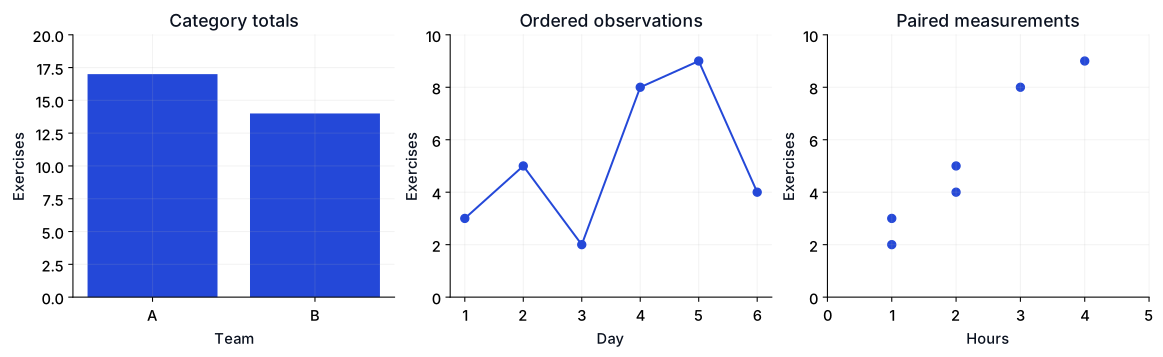
A bar chart of team totals answers how much recorded output belongs to each team. It does not answer who was more efficient, because exposure and task difficulty may differ. A time-ordered line chart shows the sequence, but connecting points implies an ordered progression. A scatter plot retains the hour/exercise pairing and lets you inspect association without inventing a causal claim.
Reproduce the summaries and chart selections
The code creates all three views and closes the figure. Add fig.savefig("workshop.svg") before closing if you want a local export. The site's published SVG is generated from the same fixture by the article figure script.
import numpy as np
import matplotlib
matplotlib.use('Agg')
import matplotlib.pyplot as plt

day = np.arange(1, 7)
team = np.array(['A', 'A', 'B', 'B', 'A', 'B'])
hours = np.array([1, 2, 1, 3, 4, 2])
exercises = np.array([3, 5, 2, 8, 9, 4])
totals = [int(exercises[team == name].sum()) for name in ['A', 'B']]
fig, axes = plt.subplots(1, 3, figsize=(12, 3.5))
axes[0].bar(['A', 'B'], totals)
axes[0].set(xlabel='Team', ylabel='Exercises', ylim=(0, 20))
axes[1].plot(day, exercises, marker='o')
axes[1].set(xlabel='Day', ylabel='Exercises', ylim=(0, 10))
axes[2].scatter(hours, exercises)
axes[2].set(xlabel='Hours', ylabel='Exercises', xlim=(0, 5), ylim=(0, 10))
fig.tight_layout()
print('team totals:', dict(zip(['A', 'B'], totals)))
print('overall exercises:', int(exercises.sum()))
print('paired records:', len(hours), 'time points:', len(day))
assert sum(totals) == exercises.sum()
plt.close(fig)
Checked output:
team totals: {'A': 17, 'B': 14}
overall exercises: 31
paired records: 6 time points: 6
Keep denominators and axes visible
Team A has 17 recorded exercises and team B has 14. A difference in totals could reflect different opportunities, hours or exercise difficulty. If you calculate exercises per hour, label the denominator and explain whether you divide summed output by summed exposure or average per-record ratios. Those are different statistics.
Bar length encodes magnitude, so a zero baseline is usually necessary for a faithful comparison. A line chart can use a narrower range when small changes are the subject, provided the scale is clear. Our example starts the exercise axes at zero so the three views remain easy to compare.
Keep the day order explicit. A line joining categories in alphabetical order would imply a progression that the category labels do not have. Similarly, joining scatter points in table order adds a path that the relationship question did not request.
Add a distribution view when totals hide variation
Six points are too few to support a detailed density estimate. With many repeated observations, inspect a histogram, box plot or individual-point distribution rather than only group means. State histogram bin choices and retain meaningful units. A smooth curve can look authoritative even when the sample is small or the chosen bandwidth drives its shape.
For accessibility, place the key numerical conclusion in the surrounding text and provide useful alternative text. Avoid relying on color alone to distinguish groups. A chart should make its comparison easier to inspect without becoming the only place the reader can find the values.
Extend the comparison
Give team B twice as many records and compare totals with per-record averages. Then create two very different distributions with the same mean. Explain which chart reveals the difference and which summary conceals it.
The Data Tools course connects table preparation to plotting. Review misleading statistics examples for axis and aggregation failures, then use groupby aggregation and transform to calculate a documented denominator before charting it.
References
Matplotlib plot types — Official examples of pairwise, distribution and categorical plotting primitives.